

A quote request comes in at 9:40 a.m. A chatbot conversation wraps up at 10:15. Someone clicks the pricing link in yesterday's email. By noon, you have a dozen new leads and enough time to properly work maybe four of them. Which four?
Lead scoring answers that question with a method instead of gut feel. It turns who a lead is and what they do into a score that tells your team who needs a call today, who needs nurturing, and who can wait. This guide follows the full path, from the first customer signal to the action it triggers and the results that tell you when to adjust.
Key Takeaways
Here are the main points, each covered in detail below:
Lead scoring ranks leads by fit (how well they match your ideal customer) and engagement (how much buying interest they show).
A score matters only when it triggers something. Every score range needs a defined next action.
Negative signals and score decay keep old or irrelevant leads off the top of your list.
Small businesses can start with a simple rule-based model and add predictive or AI lead scoring as their data grows.
A CRM collects signals from forms, email, chat, and your website in one record and updates scores automatically.
A model is never finished. Compare scores with real sales results and recalibrate.
One chain connects all of it: Signal → Score → Priority → Action → Result → Recalibration.
What Is Lead Scoring?
Lead scoring is a method of ranking leads by how likely they are to become customers. Each lead gets a score based on who they are and what they do. A lead who matches your target customer and just requested a quote scores high. A lead who downloaded one checklist six months ago and never came back scores low.
The score might be a number from 0 to 100 or a grade like A, B, or C. Either way, it gives the whole team one consistent answer to the question "How much attention does this lead deserve right now?"
That consistency is what makes a lead scoring system useful. Without one, a salesperson chases the loudest or most recent lead. With one, a "hot" lead means the same thing to everyone. Marketing lead scoring usually decides when a lead is ready to move from nurturing to a sales conversation, and sales lead scoring decides who gets contacted first.
Keep in mind that a score is an estimate. It can't see a budget freeze or a competitor's offer, so every score should trigger a next step, followed by a check on what actually happened.
Why Is Lead Scoring Important for Small Businesses?
Large companies can pay people whose whole job is sorting leads. A small business usually can't. The owner answers chat messages between jobs, and one salesperson handles every inbound inquiry on top of existing accounts. When time is that tight, the order in which you work leads directly affects revenue.
Lead scoring helps a small team spend limited hours where they count. The most practical benefits include:
Faster response to serious buyers. A quote request gets flagged right away instead of waiting behind newsletter signups.
Less time on poor-fit leads. Leads outside your service area or price range drop to the bottom before anyone books a call.
Better nurturing. Leads who aren't ready get useful emails instead of pushy calls, and they rise again when their activity picks up.
One set of rules for marketing and sales. Both sides share one definition of a qualified lead, which ends a lot of "these leads are junk" arguments.
Clearer marketing decisions. When you see which channels bring in high-scoring leads, you know where next month's budget should go.
None of this requires a data science team. A simple model that sorts leads into three groups already beats treating every inquiry the same way.
How Does Lead Scoring Work?
Lead scoring works as a loop with six stages. Each stage feeds the next, and the last one feeds back into the first.
Signal. A lead shares information through who they are (role, company size, location) or what they do (visiting your pricing page, clicking an email, starting a chat).
Score. Your lead scoring model turns signals into points. Strong signals add more, weak ones add less, and negative signals subtract.
Priority. The total places the lead in a range: high, medium, or low.
Action. Each priority level triggers a specific next step, such as a sales call or a nurture sequence.
Result. The lead converts, stalls, or drops out, and the outcome gets recorded.
Recalibration. You compare scores with results and adjust the model.
Many explanations of lead scoring stop at stage two. The score creates value only after that, when it changes what your team does and when real outcomes confirm or correct it.
Throughout this guide, we'll use a hypothetical commercial cleaning company that sells recurring contracts to offices and medical clinics. A property manager fills out its quote request form (signal). Her form answers and the request itself bring her score to 70 (score), which puts her in the top band (priority). The CRM creates a task for a rep to call her within one business day (action). She signs a contract (result). Months later, the team sees that quote requests convert better than any other signal and gives them more weight (recalibration).
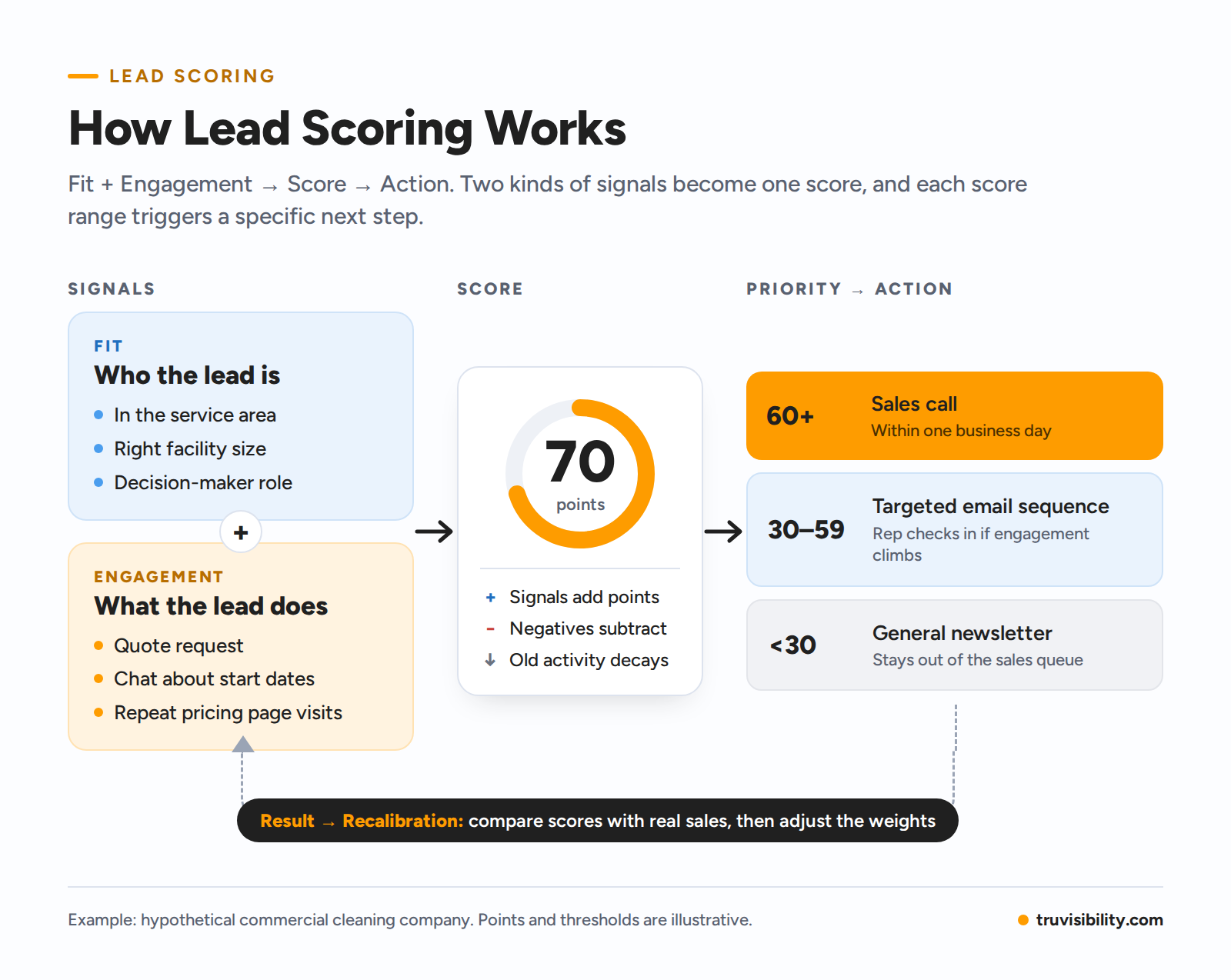
Lead scoring process diagram. Fit signals and engagement signals combine into a score, and each score range triggers an action: 60+ sales call, 30-59 targeted email sequence, under 30 general newsletter. Results feed back to recalibrate the model.
What Data Should You Use for Lead Scoring?
Every lead scoring model runs on two kinds of data. Fit data tells you whether a lead is the right kind of customer. Engagement data tells you whether they're interested right now. You need both: a perfect-fit company that never visits your site isn't ready to buy, and an eager visitor outside your service area can't become a customer.
Fit Data: Is This the Right Lead?
Fit data, also called explicit or demographic data, describes the lead and their company. It answers one question: if this person wanted to buy today, would they be a good customer for you?
In B2B lead scoring, the most common fit-based lead scoring criteria are industry, company size, location, the contact's role, and budget range. Each one earns more or fewer points depending on how closely it matches your best customers. Our cleaning company might give 15 points for a business inside its service area and 10 for a facility large enough to support a profitable contract. A facilities manager who can sign earns more than an intern at the same company.
Most fit data comes from your forms, so choose form fields with scoring in mind.
Engagement Data: Is This Lead Showing Buying Intent?
Engagement data, also called behavioral or implicit data, tracks what a lead does: pages viewed, emails clicked, forms submitted, chats started, meetings booked. Fit shows whether someone could buy. Engagement shows whether they're moving toward buying.
Actions deserve different weights based on how close they sit to a purchase. Reading a blog post shows curiosity. Clicking an email link shows interest in a topic. Two pricing page visits in one week suggest active comparison. A consultation request is a direct hand-raise and should outweigh them all. Treat email opens with caution, since some email apps load messages automatically and record opens no person made.
Negative Signals and Score Decay
A lead score should be able to go down as well as up. Negative signals subtract points when a lead turns out to be a poor fit or starts losing interest: an address outside your service area, an unsubscribe, a bounced email. Some negatives, like a job applicant using your contact form, should remove the lead from sales follow-up entirely.
Score decay lowers the weight of older activity over time. A pricing page visit from yesterday means something. The same visit from eight months ago means much less. Without decay, last year's active lead can sit at the top of your list long after the interest faded.
Here's how all four pieces (fit, engagement, negative signals, and decay) work together in one simple model for our cleaning company, a small B2B business. Like most lead scoring examples, the points below are illustrative. They show the logic and aren't a standard to copy, since your own values should come from your own sales history.
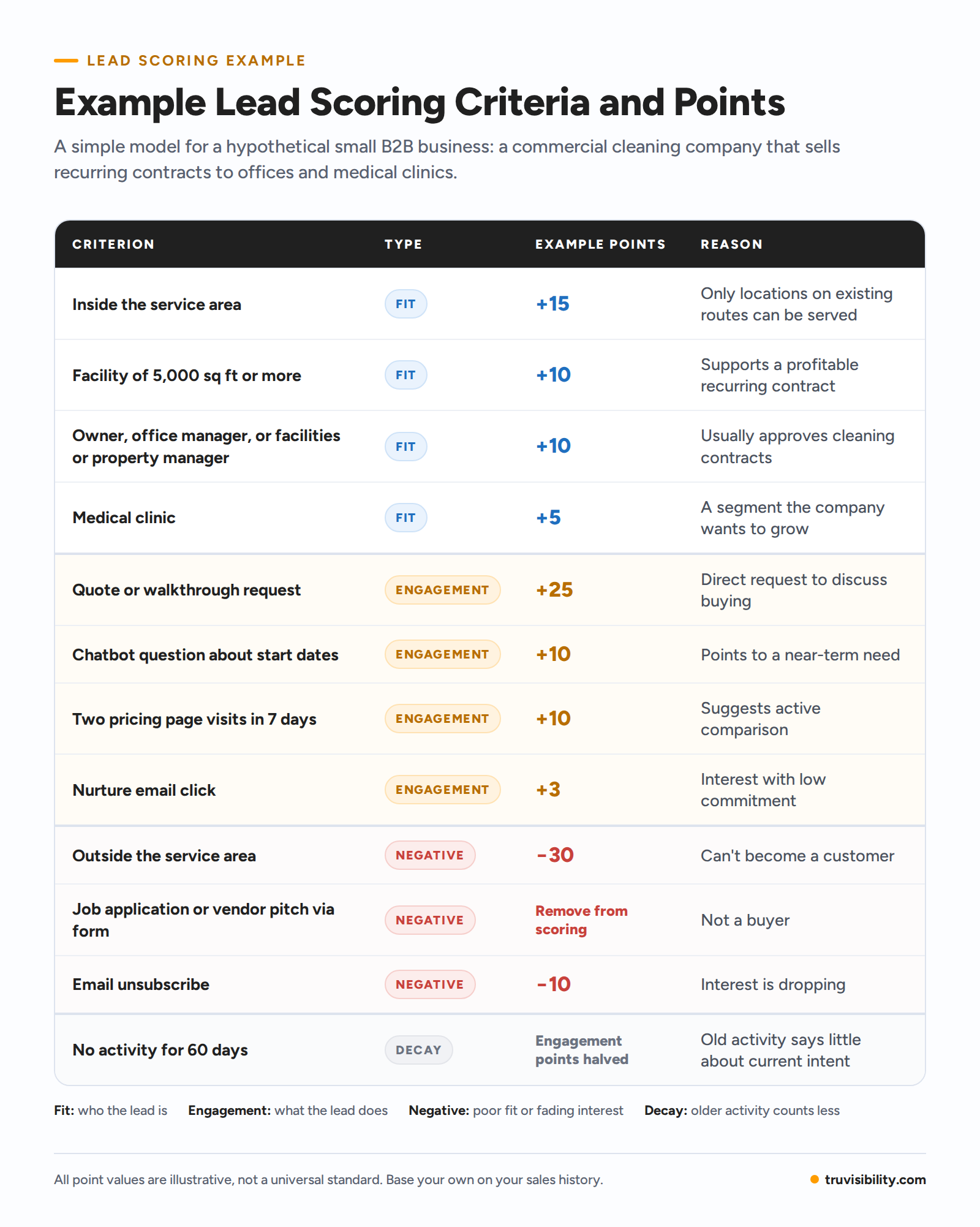
Example lead scoring criteria for a hypothetical small B2B commercial cleaning company, with fit, engagement, negative, and decay criteria, illustrative point values, and reasons.
A total score can hide what's behind it, so it helps to look at fit and engagement separately. A lead scoring matrix places every lead in one of four quadrants:
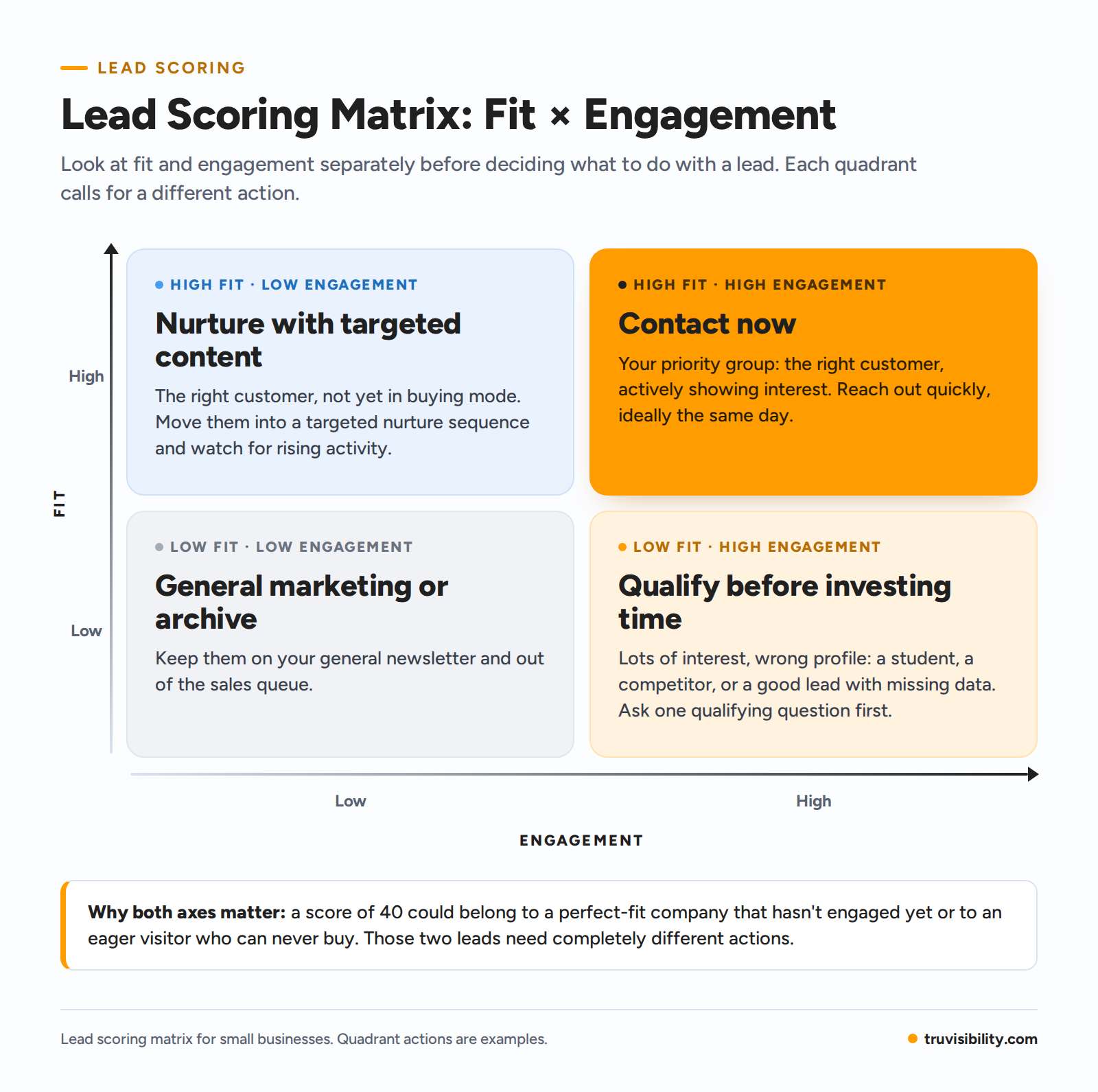
Lead scoring matrix of fit versus engagement, showing the action for each of the four combinations.
High fit, high engagement. Your priority group. Contact these leads quickly, ideally the same day.
High fit, low engagement. The right customer, not yet in buying mode. Move them into a targeted nurture sequence and watch for rising activity.
Low fit, high engagement. Lots of interest, wrong profile. It could be a student, a competitor, or a good lead with missing data. Ask one qualifying question before spending sales time.
Low fit, low engagement. Keep them on your general newsletter and out of the sales queue.
This is why one combined number can mislead. A score of 40 could belong to a perfect-fit company that hasn't engaged yet or to an eager visitor who can never buy, and those two leads need completely different actions.
Types of Lead Scoring Models
There are three main approaches to building lead scoring models. The biggest difference between them is who decides the weights: your team, an algorithm, or both.
Rule-Based Lead Scoring
In a rule-based model, your team picks the criteria and assigns the points, like in the example table above. It's the most common starting point for small businesses because it's transparent. Anyone can see why a lead scored 65 and trace it back to specific actions. The drawback is that rules reflect your assumptions at the time you wrote them. Your offer changes, your market shifts, and rules that made sense last year can drift away from what actually predicts a sale. Rule-based scoring needs a scheduled review.
Predictive and AI Lead Scoring
Predictive lead scoring uses historical data to find patterns. The system compares leads that became customers with leads that didn't, identifies the traits and behaviors that separated the two groups, and scores new leads by how closely they resemble past buyers.
AI lead scoring usually refers to predictive models powered by machine learning, which can weigh many signals at once and adjust as new outcomes come in. The two terms overlap heavily: predictive describes the goal, and AI describes the technology many lead scoring software tools use to reach it. Both depend on data. A model learns only from the outcomes you've recorded, so a few dozen closed deals give it little to work with.
Hybrid Lead Scoring
A hybrid model combines both approaches. You set rules for business knowledge the data can't capture, such as service-area limits and disqualifiers, and an automated or AI layer finds engagement patterns you might miss. Rules keep the model grounded while lead volume is modest, and the automated layer gets more useful as your CRM collects history.
For most small businesses, the practical path is to start rule-based and add automation as data builds up.
How to Build a Lead Scoring Model for a Small Business
Your first lead scoring methodology doesn't need an analyst or years of data. It needs a few hours, your CRM records, and an honest conversation with whoever handles sales.
Step 1: Define What a Qualified Lead Means to Your Business
Start at the end of the chain. What does a lead need to look like, and what do they need to do, before a salesperson should spend time on them? Put the answer in one or two sentences. For our cleaning company, it might be: "A business in our service area with at least 5,000 square feet that has asked for a quote or walkthrough." Then name the target action that shows sales readiness, such as booking a consultation. Every point you assign later should measure progress toward that definition.
Step 2: Look at Your Best and Worst Historical Leads
Pull your last 20 to 50 closed deals and a similar number of leads that went nowhere. Look for what the winners had in common: industry, size, location, how they found you, the first action they took. Then study the losers. If most lost leads came from one channel or one company size, that pattern belongs in your model. Even a small sample beats guessing.
Step 3: Choose Fit and Engagement Signals
From that comparison, pick the handful of signals that clearly separated buyers from non-buyers. Three to five fit criteria and five to eight engagement actions are plenty to start. Skip anything you can't capture reliably. If your forms don't ask for company size, you can't score it yet, so either add the field or leave the criterion out.
Step 4: Assign Relative Weights
Weights should reflect how strongly each signal predicts a sale compared with the others. One simple method: calculate your overall lead-to-customer rate, then check the rate for leads that showed each signal. If 8% of all leads become customers but 35% of leads who booked a walkthrough do, that signal deserves heavy weight. If guide downloads convert at 9%, barely above average, they deserve very little.
Sort signals into strong, moderate, and weak tiers before you assign numbers. Then cap the points low-value actions can add, so a lead who opened 30 newsletters can't outscore someone who asked for a quote.
Step 5: Add Negative Scoring and Recency
Next, build negative signals and decay into your model. Decide which negatives subtract points and which disqualify a lead outright. Set the decay window by your sales cycle: if most deals close within 30 days of first contact, engagement older than 60 to 90 days probably says little about current intent. Also make sure a lead can recover. A fresh quote request from a lead whose score had decayed should push it back up right away.
Step 6: Create Score Bands and Define the Next Action
Group scores into three or four bands and attach one clear action to each. On our cleaning company's scale, the bands might look like this:
60 and above: a sales rep calls within one business day.
30 to 59: the lead enters a targeted email sequence, and a rep checks in if engagement climbs.
Below 30: the lead stays on the general newsletter.
There's no universal threshold. The right cutoffs depend on your point scale, your lead volume, and how many leads your team can realistically contact each week. If the top band produces more leads than sales can call, raise the bar.
Step 7: Test and Recalibrate the Model
Before switching the model on, run it against last quarter's leads. Did the ones that became customers land in your top band? If not, adjust before going live. After launch, review the model monthly for the first few months and quarterly after that, and ask your sales team which high scorers turned out to be wasted calls.
How to Use Lead Scoring in a CRM
A lead scoring model in a spreadsheet works for about a week. Then leads pile up, someone forgets an update, and the list goes stale. Dedicated lead scoring tools exist, but for most small businesses the CRM is the natural home for scoring, because that's where lead data already lives. It does three jobs.
First, it centralizes signals. A lead might fill out a form on Monday, click an email on Wednesday, and chat with your website bot on Friday. If those actions live in three separate tools, nobody sees the full picture. CRM lead scoring ties them to one contact record, so the score reflects everything the lead has done.
Second, it keeps scores current. When a new signal arrives, the score updates automatically, and decay rules lower it as activity ages. Your team always works from today's numbers.
Third, it turns priority into action. With lead scoring automation, a lead who crosses into your top band can trigger a task for a rep or a move into a specific email sequence. Segmentation lets marketing send high-fit, low-engagement leads different campaigns than everyone else. Reporting closes the loop by showing which scores turned into sales.
TruVISIBILITY CRM brings these pieces together. It includes AI-powered automated lead scoring, plus data record completeness scoring that shows how complete each contact record is. Each contact's 360° view records form submissions, web pages viewed, email opens and clicks, live chat and chatbot transcripts, SMS messages, meetings, and sales history. Because the CRM works with our Sites, Forms, Messaging, and Chat apps, the signals your website and campaigns generate land in one place. From there, you can build segments with advanced rules, set workflow automations for fields and tags, assign tasks to your team, and track results on real-time dashboards. You can sign up free and see how scoring works with your own leads.
Common Lead Scoring Mistakes to Avoid
Even a well-built model fails when the team misreads or misuses the scores. Each of these six mistakes breaks a link between score and result.
Treating a high score as a guaranteed sale. A score estimates likelihood from the signals you can see. A lead with 85 points may still have no budget this quarter or may be collecting quotes to pressure a current vendor. Use the score to decide who to call first, and let the conversation decide the rest.
Sending every high-scoring lead directly to sales. Heavy engagement from a poor-fit lead can inflate a score. A student researching a paper can rack up more page views than a real buyer. Check fit before routing, so an eager but unqualified visitor doesn't eat a rep's afternoon.
Failing to define an action for each score range. If a lead scores 45 and nobody knows what that means, the score is decoration. Every band needs an owner, a next step, and a time frame, such as "call within one business day" or "add to the nurture sequence today."
Marketing and sales interpreting scores differently. When marketing calls 50 "sales-ready" and sales considers it lukewarm, leads fall through the gap and trust in the model drops. Agree on definitions and thresholds together, and write them down.
Using one scoring model for very different customer groups. A property manager buying for 12 buildings and a single dental office follow different buying paths. When your segments buy differently, give each its own criteria and thresholds.
Relying on poor or incomplete CRM data. Missing job titles, duplicate contacts, and chat conversations that never reach the CRM all distort scores. A model is only as accurate as the records behind it, so clean up the data before blaming the scoring rules.
How Do You Know If Your Lead Scoring Model Is Working?
The real test of a lead scoring model is what happens to the leads it ranks. Three checks tell you most of what you need to know.
Start with conversion by score band. Leads in your top band should become opportunities and customers at a clearly higher rate than leads in lower bands. Track both steps: how many top-band leads become opportunities, and how many of those opportunities close. If your 60-plus leads close at 20% and your under-30 leads close at 3%, the model separates buyers from browsers. If the rates are close, it doesn't, no matter how precise the points look.
Next, check speed to contact. Scoring should get your best leads a faster response than everyone else. If top-band leads still wait two days for a call, the problem sits in the action stage, and changing the scoring rules won't fix it.
Then study the misses. Once a quarter, review customers who scored low and high scorers who went nowhere. Low-scoring customers point to signals your model is missing. High-scoring dead ends point to signals you're overweighting.
When scores and sales results don't line up, recalibrate. Adjust weights, add or remove criteria, or move thresholds, then measure again once a few dozen new leads have moved through each band. This last link feeds straight back into the first: sharper signals produce better scores and better priorities.
Conclusion
Lead scoring gives a small team a consistent way to decide where its limited time goes. It starts with signals: who a lead is and what they do. Those signals become a score, the score sets a priority, and the priority triggers a specific action. The results show whether the model got it right, and you recalibrate.
Most lead scoring best practices come down to starting simple. Define a qualified lead for your business, study past wins and losses, and build a rule-based model with a few strong criteria and a clear action for each score band. Run it in a CRM so signals from forms, email, chat, and your website update scores automatically. Then check it against real sales and adjust. A modest model your team trusts and uses every day is worth more than an elaborate one nobody acts on.
FAQ
What Is a Good Lead Score?
There's no universal good lead score, because every model uses its own scale and criteria. A good score is one that reliably predicts conversion for your business. Check which range most of your past customers fell into and set your sales-ready threshold near the bottom of that range.
Can a Lead Score Go Down?
Yes. Scores drop when a lead shows negative signals, such as unsubscribing, being outside your service area, or using your contact form to apply for a job. Score decay also lowers engagement points over time, so a lead who stops interacting gradually slides down your priority list.
What Is the Difference between Lead Scoring and Lead Qualification?
Lead scoring ranks leads automatically by fit and engagement. Lead qualification is the step where a person confirms whether a lead has a real need, budget, authority, and timeline. Scoring decides who gets qualified first, and qualification decides who is worth pursuing.
How Many Criteria Should a Lead Scoring Model Have?
Three to five fit criteria and five to eight engagement actions are enough for a first model. That separates strong leads from weak ones without creating something nobody on your team can explain. Add criteria only when sales results show a signal that clearly predicts conversion.
Can Small Businesses Use Lead Scoring with Limited Data?
Yes. A rule-based model works with small data sets because you set the criteria from what you already know about your customers. Even 20 to 30 past deals can reveal useful patterns. Predictive and AI lead scoring become more practical once your CRM has more history on wins and losses.
How Often Should Lead Scores Be Updated?
Individual scores should update every time a lead takes an action, which a CRM handles automatically. The scoring model itself needs a slower rhythm: review it monthly for the first few months after launch, then quarterly, or sooner if your offer, pricing, or target market changes.
Does Every Business Need Lead Scoring?
Not always. If you get a handful of leads a week and can follow up with each one personally, a formal model adds little. Lead scoring earns its place when lead volume outgrows your team's time and you need a consistent, shared way to decide who to contact first and who can wait.
Related articles


Want to receive more articles?
Sign-up for our weekly newsletter to receive info that will help your business grow